
Deposit Crypto
The Deposit crypto feature of the Partner Portal lets you top up your fiat balance by sending cryptocurrency to a Paybis wallet. Paybis converts the crypto to your balance currency automatically once the payment is detected. This guide explains each step.
Prerequisites
Deposit crypto must be enabled for your account. Contact your Paybis account manager if you don't see Deposit crypto under Accounts in the left menu.
How to Deposit Crypto
Open Accounts > Deposit crypto. A deposit has two steps: Amount and Review.
1. Amount
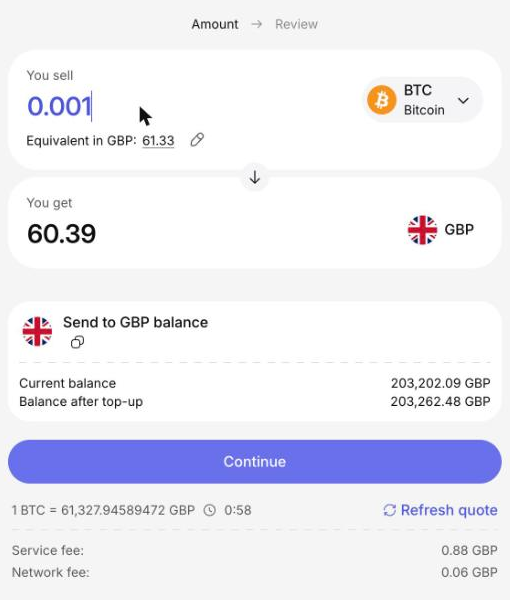
- You sell: The amount of cryptocurrency you want to send. Select the cryptocurrency (and its network) from the list. The equivalent in your balance currency is shown below.
- You get: The amount that will be added to your balance.
Enter the amount to sell; the amount you get is calculated from the current rate.
The page also shows:
- the destination balance and the Balance after top-up;
- the rate (for example, "1 BTC = ... GBP") with a countdown timer and a Refresh quote link;
- the Service fee and the Network fee.
Click Continue to go to the next step.
2. Review and Send
The Review step shows the deposit instructions:
- Crypto: The cryptocurrency to send.
- Amount: The exact amount to send.
- Wallet address: The Paybis wallet address to send the crypto to. A QR code with the address is shown next to it.
Use the copy icons or Copy details to copy the values, then send the crypto from your own wallet. The Transaction details panel shows the rate, the amount you sell, the total you get, the fees, and the destination balance.
Click Done when you have noted the instructions. Once Paybis detects your payment, the exchange completes automatically and your balance is updated.
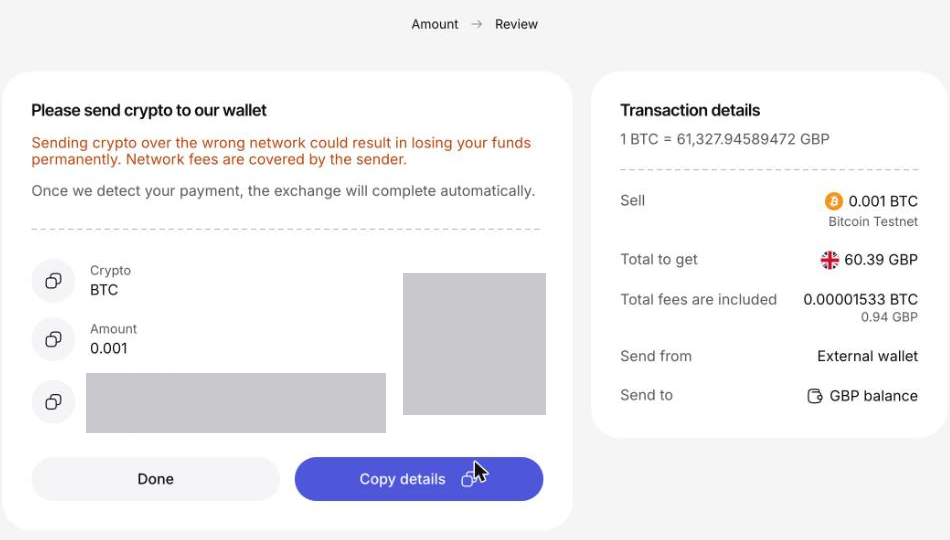
Important: Send the crypto over the network shown on the page. Sending crypto over the wrong network could result in losing your funds permanently. Network fees are covered by the sender.
Track the Deposit
Monitor the status of your deposit in the Transactions tab. Deposits appear there as "Top up" transactions with the direction Incoming.
Important Notes
✅ Send the exact amount: Send the amount shown on the Review step.
✅ Verify the network: Make sure the network of your sending wallet matches the network shown on the page.
✅ Quote validity: The rate shown on the Amount step is time-limited. Use Refresh quote to update it.
Updated about 1 hour ago